Understanding Browser Extension Messaging
A little dive into browser extension messaging architecture, born from building a real SaaS product. Learn how different extension contexts communicate and how to architect your messaging system properly.
Understanding Browser Extension Messaging
Why I'm Writing This
While building a Chrome extension for automated documentation generation (a story for another day), I found myself drowning in a sea of browser extension messaging concepts. Background scripts, content scripts, popup windows, offscreen documents - each piece seemed simple in isolation, but orchestrating communication between them felt like conducting an orchestra where every musician was in a different room.
After many late nights of debugging and several "aha" moments, I've developed a mental model that I wish I had when starting.
The Key Mental Model
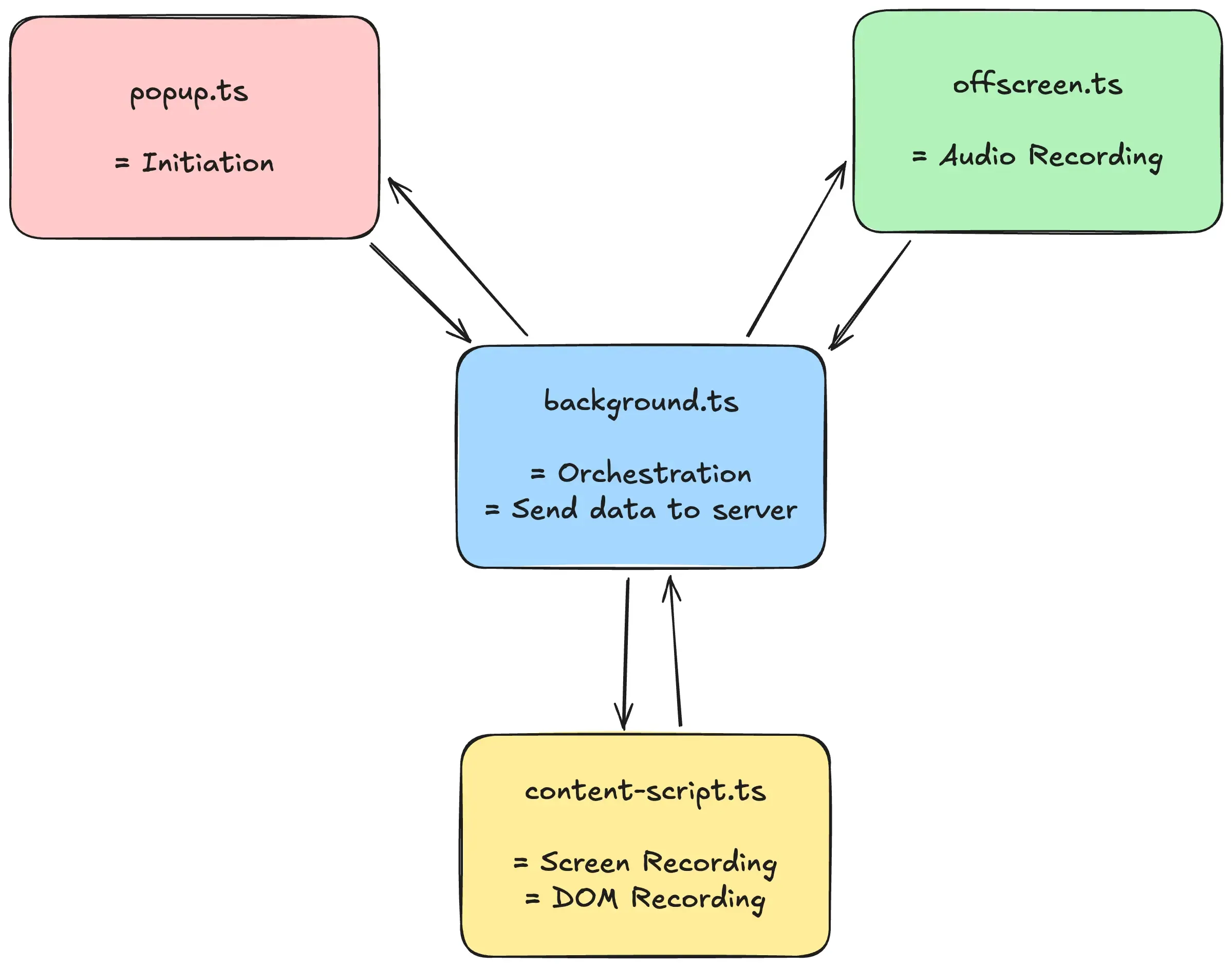
Think of a browser extension as a distributed system running in a single browser. Each component (background worker, popup, content script) is like a microservice with its own lifecycle and constraints. The key to mastery? Understanding not just how they communicate, but why they're separated in the first place.
Deep Dive into Extension Messaging
1. The Players in Our Distributed System
Let's break down each component and its role:
// Example message type definition
interface Message {
  target: "background" | "content-script" | "popup" | "offscreen";
  action: string;
  data?: unknown;
}
Background Service Worker
- The orchestrator
- Always running (but can be inactive)
- Can't access DOM
- Handles long-running tasks
// From my actual implementation
export default defineBackground(() => {
  browser.runtime.onMessage.addListener((message, sender, sendResponse) => {
    if (message.target !== "background") return;

    const handleMessage = async () => {
      switch (message.action) {
        case "start":
          // Handle start action
          break;
        case "stop":
          // Handle stop action
          break;
      }
    };

    handleMessage();
    return true; // Important for async responses!
  });
});
Content Scripts
- Your "eyes and ears" in the webpage
- Can access DOM
- Limited access to extension APIs
// Content script message handling
browser.runtime.onMessage.addListener(async (message) => {
  if (message.target !== "content-script") return;

  switch (message.action) {
    case "track-dom":
      startDomTracking();
      break;
    case "stop-tracking":
      stopDomTracking();
      break;
  }
});
Popup UI
- Temporary lifecycle
- Rich UI capabilities
- Dies when closed
// Popup component
function PopupApp() {
  const sendMessage = async () => {
    await browser.runtime.sendMessage({
      target: "background",
      action: "start",
      data: {
        /* configuration */
      },
    });
  };
}
Offscreen Documents
- Modern replacement for background pages
- Handles tasks requiring DOM but no UI
- Perfect for audio processing, canvas operations
2. Common Pitfalls and Solutions
- Race Conditions
// BAD: Fire and forget
browser.runtime.sendMessage({ action: "do_something" });

// GOOD: Wait for response
const response = await browser.runtime.sendMessage({ action: "do_something" });
if (response.success) {
  // Continue
}
- Message Handler Memory Leaks
// BAD: Listeners pile up
function addListener() {
  browser.runtime.onMessage.addListener(handler);
}

// GOOD: Clean up listeners
const handler = (message) => {
  /* ... */
};
browser.runtime.onMessage.addListener(handler);
return () => browser.runtime.onMessage.removeListener(handler);
- Context Death
// BAD: Assuming context is always alive
// GOOD: Handle disconnects gracefully
try {
  await browser.runtime.sendMessage({
    /* ... */
  });
} catch (error) {
  if (error.message.includes("receiving end does not exist")) {
    // Handle disconnected context
  }
}
What I'd Do Differently
- Start with TypeScript - Define your message types early. I started without it and regretted it.
- Use a Message Bus Pattern - Centralize message handling logic instead of spreading it across files.
- Build with Testing in Mind - Mock the messaging system for easier testing.
While I used WXT (a fantastic framework) for my extension, these principles apply to any browser extension. The framework handles the boilerplate, but understanding the underlying architecture is crucial.
Resources
- Chrome Extension Architecture Overview
- Browser Extension Messaging Guide
- WXT Framework - If you want a modern development experience